Here you can find free stuff Like Antiviruses, Free Web-Hosting Plans, Free Games and many more.

Get Updates on Internet of Things

Here You can Find Latest News and Reviews on Technology and the growing internet of things.

Get Paid Softwares and Games for free.

Here You can Find Piad Softwares for free and many others like Antiviruses,Anti-Malware,Photo-Editing,Games etc.

Find Your Desired Online Course for your Better Future.

Here You can Find Your Desired Carrer Making Free and Paid Online Courses and make your own Career.

Get Extra Deal Software

You can Find Extra Deal Softwares that including Parental Control, Firewalls and many more.

Get Best Development Softwares for Free.

If you are a Developer you Can Find Very Useful IDE's for your Work and that all are Free.

Showing posts with label security. Show all posts

Saturday, 3 June 2017

5 Reasons why internet security is crucial in 2017

5 Reasons why internet security is crucial in 2017

5 Reasons why internet security is crucial in 2017

Ever imagined a week without the internet? That sounds crazy, especially if your bread and butter require that you always stay online. As we live in the Internet Age, it is next to impossible to imagine life without staying connected. The internet is a useful tool in many aspects of our life, from communication down to business.
While the internet is proven to be useful, it also comes with a few drawbacks. Some people are using the Internet to cause harm to others. In the United Kingdom alone, there were an estimated 6.2 million incidents of cyber crime in 2016. Even Singapore, which is dubbed as the safest country in Asia, is not free from online scams. 

The government, as well as many private organizations, are becoming more proactive in dealing with the growing rate of cyber security. Here are some reasons why Internet security is of the utmost importance in 2017:
  1. Computer viruses and malware are more complex than ever. The Locky ransomware, by far, is the most dangerous computer virus you could have. The intruders will send you a fake email demanding you to open an attached Word document. Once you open the document, it will enable Macro commands and the malware could get inside your computer.
  2. Scammers are using more advanced ways of tricking users. PhishMe’s chief technology and officer Aaron Higbee said the recent Google Docs phish scam tricks the user into granting permissions to a third-party app. The scammers will not lead you to fake websites for you to give up your passwords. They will not use malware to cause harm. The scammers are pretty good at mimicking Google web pages you would think they are authentic.
  3. Data breaches in 2017 are the worst so far. When an unauthorized individual used your sensitive and confidential data, you just became a victim of data breaching. Aside from individuals, popular hotel chains, fast food chains, and even job-seeking websites have been victims of data breaching.
  4. There are hackers who will do everything they can to cause disruption. Some hackers will not harm your computer with a virus but will steal your data for their advantage. Hackers usually target government networks because it becomes easier for them to access people’s personal information, including social security numbers and fingerprints.
  5. Business Email Compromise (BEC) attack would likely continue to grow according to FBI. In this kind of phishing scam, the attacker will impersonate a company’s executive and will encourage customers or employees to transfer funds. You may use an email protection kit to stop attacks before they reach your inbox. 
How will you protect yourself from any form of phishing? The best way to do that is to install a legitimate antivirus software that offers an overall protection from threats. The best computer antivirus according to Computer Fixperts has a thorough malware detection. Furthermore, it should safeguard you against dangerous websites, harmful downloads, and suspicious emails. For maximum protection against online threats, make sure that your antivirus software is up-to-date.
Share:

Tuesday, 30 May 2017

Critical 'Port Fail' Vulnerability Reveals Real IP Addresses of VPN Users

Critical 'Port Fail' Vulnerability Reveals Real IP Addresses of VPN Users


A newly discovered flaw affecting all VPN protocols and operating systems has the capability to reveal the real IP-addresses of users' computers, including BitTorrent users, with relative ease.

The vulnerability, dubbed Port Fail by VPN provider Perfect Privacy (PP) who discovered the issue, is a simple port forwarding trick and affects those services that:
  • Allow port forwarding

  • Have no protection against this specific attack
Port Forwarding trick means if an attacker uses the same VPN (Virtual Private Network) as the victim, then the real IP-address of the victim can be exposed by forwarding Internet traffic to a specific port.
"The crucial issue here is that a VPN user connecting to his own VPN server will use his default route with his real IP address, as this is required for the VPN connection to work," Perfect Privacy wrote in a blog post on Thursday.

Port Fail affects all VPN protocols including…
  • OpenVPN
  • IPSec
…as well as applies to all operating systems, posing a huge privacy risk.

How Does 'Port Fail' Work?

A successful IP address leak attack requires an attacker to be on the same VPN network as the victim and to know the victim's VPN exit IP address, which could be discovered by tricking a victim into visiting a website control controlled by the attacker.
For example, an attacker with port forwarding enabled can see the request from the victim's actual IP addresses by tricking the victim into opening an image file.

The same attack is possible for BitTorrent users, but, in this case, there is no need for the attacker to redirect the victim to their page.
In this case, the attacker only with the activated port forwarding for the default BitTorrent port, can expose the real IP-address of a VPN user on the same network.

Affected VPN Providers

The flaw affected various large VPN providers. Perfect Privacy tested nine VPN providers out of which five were found to be vulnerable to this flaw and were alerted last week.
VPN providers including Private Internet Access (PIA), Ovpn.to and nVPN have fixed the issue before publication.
However, the company warned, "other VPN providers may be vulnerable to this attack as we could not possibly test all."
Share:

Saturday, 6 May 2017

How Intel AMT Vulnerability Allows to Hack Computers Remotely - Explained

Explained — How Intel AMT Vulnerability Allows to Hack Computers Remotely


Earlier this week Intel announced a critical escalation of privilege bug that affects its remote management features shipping with Intel Server chipsets for past 7 years, which, if exploited, would allow a remote attacker to take control of vulnerable PCs, laptops, or servers.

The vulnerability, labeled CVE-2017-5689, affects Intel remote management technologies, including Active Management Technology (AMT), Intel Standard Manageability (ISM), and Intel Small Business Technology (SBT) software, versions 6 through 11.6.

The flaw was originally discovered by Maksim Malyutin, a member of Embedi research team, in mid-February, who then responsibly disclosed it to the Intel security team.


My previous article, published earlier this week, was based on the partial information shared by Maksim to The Hacker News, as the reported Intel AMT vulnerability was highly critical and can be exploited remotely, Embedi held technical details until most sysadmins update their systems with a patched firmware.

Today, Embedi research team has disclosed complete technical details about the critical vulnerability, revealing that a remote attacker can hijack computers powered by Intel Chipset just by sending an empty authentication string.

To understand how, I have compiled this piece explaining:

  • What is Intel AMT technology?
  • Where the Intel AMT Vulnerability resides?
  • How can an attacker exploit Intel AMT Vulnerability?

What is Intel AMT technology?


Intel-based chipsets come with an embedded technology, called Intel Active Management Technology (AMT), to enhance the ability of IT administrators, allowing them to remotely manage and repair PCs, workstations, and servers of their organization.

Using a web-based control panel, accessible from port 16992 and 16993, which comes pre-installed on the chipset, an administrator can remotely manage a system.

The Intel AMT Web Interface works even when the system is turned off, as long as the platform is connected to a line power and a network cable, as it operates independently of the operating system.

Where the Intel AMT Vulnerability resides?


To protect Intel AMT Web Interface from unauthorized users, the service makes use of HTTP Digest and Kerberos authentication.

The escalation of privilege vulnerability resides in the way Intel AMT Web Interface handles user authentication over HTTP Digest protocol, which is based on a simple challenge-response paradigm.
Before going into the technical details about the exploitation of this vulnerability, first, you need to know how the Digest authentication works.

The Digest authentication completes in the following steps:
  • Client requests server to initiate login, and in response, the server returns a randomly generated 'nonce' value, the HTTP method, and the requested URI.
  • Next, the user is prompted to enter his username and password.
  • Once entered, the client machine sends an encrypted string (referred as user_response)—generated by applying a hash function to the entered username and password, server-supplied nonce value, HTTP method, and the requested URI—to the server.
  • The server also calculates a similar encrypted string (referred as computed_response) using username and password stored in the database and all the other three values.
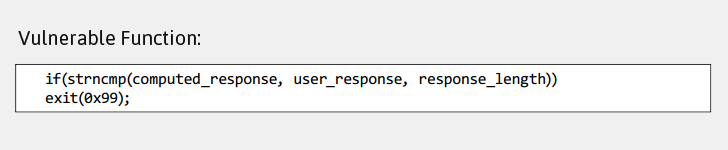
  • The server compares both the strings using the strncmp() function and if they match, it allows the user to log into the Intel AMT Web Interface.
The Intel AMT vulnerability resides exactly in the strncmp() function that server uses to compare both encrypted strings.
Syntax example:
strncmp (string_1, string_2 , length)
—where, length parameter defines how many characters needs to be compared.
Strncmp() is a binary safe string comparison function that returns a negative, zero, or a positive integer depending upon whether string_1 is greater or less than string_2, and if they are equal, it returns zero.


As, it’s obvious, for successful authentication, user_response variable must be equal to computed_response variable; hence the strncmp() function must return a zero value for any length.

But, according to the researcher, the programmers who coded this authentication process for Intel platform mistakenly used the length of the user_response variable in strncmp() function, instead of the computed_response variable for response_length parameter.

How can an attacker exploit Intel AMT Vulnerability?


To exploit this logical flaw in Intel AMT Web Interface, all an unauthorized attacker needs to do is send nothing (null) into user_response to the server.

Since the strncmp() function is mistakenly using character length of the user_response variable to authorize the user, which in this case is null, the string comparison function would be tricked into matching nothing and believe that attacker's response (user_response) is equals to the computed_response.

As both variables matched, the attacker will be authenticated to log into the Intel AMT Web Interface and do whatever an authorized administrator can do, gaining high-level privileges on the system.

How Bad is this Vulnerability? Very Bad, Believe me.


An attacker can also use Keyboard Video Mouse (KVM) feature, available inside Intel AMT Web Panel, which runs at a hardware level and allows sysadmins to remotely take control of the whole system, and perform tasks like:
"[Attacker] can remotely load, execute any program to the target system, read/write any file (using the common file explorer)," the research team wrote in its paper [PDF]. "Using IDE-R (IDE Redirection), [the attacker] can remotely change the boot device to some other virtual image for example." 
"Using SOL (Serial over LAN), [the attacker] can remotely power on/power off/reboot/reset and do other actions with this feature. Also, it can be used to access BIOS setup for editing," the team added.
In short, a potential attacker can do everything that a sysadmin can do: he can log into a vulnerable machine's hardware, and silently perform malicious activities, like tampering with the system and installing virtually undetectable malware.

Install Firmware Update to Patch the Vulnerability NOW!


The bug affects Intel manageability firmware versions 6.x, 7.x, 8.x 9.x, 10.x, 11.0, 11.5, and 11.6 for Intel's AMT, ISM, and SBT platforms. However, versions before 6 or after 11.6 are not impacted.

Intel has rated the vulnerability as highly critical and released new firmware versions, instructions to detect if any workstation runs AMT, ISM, or SBT, a detection guide to check if your system is vulnerable, and a mitigation guide for those organizations that can not immediately install updates.

So, the Intel customers are strongly recommended to install a firmware patch without wasting a single second.

Also, there's a simple mitigation tool available on Github, created by Malware researcher Bart Blaze, which is based on the Mitigation Guide provided by Intel.

All an affected user has to do is, just download and run DisableAMT.exe, it will disable Intel AMT on Windows operating system (x86 and x64).
Share:

PCs with Intel Server Chipsets, Launched Since 2010, Can be Hacked Remotely

PCs with Intel Server Chipsets, Launched Since 2010, Can be Hacked Remotely 

Updated: Since the below-reported vulnerability is highly critical and it would take a few weeks for sysadmins to protect their enterprise network, the research team has not yet disclosed the technical details of the vulnerability.

Meanwhile, I have talked with Maksim Malyutin, a member of Embedi research team who discovered the vulnerability in March, and updated my article based on the information provided by him.

A critical vulnerability has been discovered in the remote management features on computers shipped with Intel processors for past seven years (and not decade), which could allow attackers to take control of the computers remotely, affecting all Intel systems, including PC, laptops, and servers, with AMT feature enabled.

As reported earlier, this critical flaw (CVE-2017-5689) is not a remote code execution, rather Malyutin confirmed to The Hacker News that it's a logical vulnerability that also gives remote attackers an opportunity to exploit this bug using additional tactics.

This elevation of privilege bug resides in the Intel Management Engine (ME) technologies such as Active Management Technology (AMT), Small Business Technology (SBT), and Intel Standard Manageability (ISM), according to an advisory published Monday by Intel.

These remote management features allow a systems administrator to remotely manage large fleets of computers over a network (via ports 16992 or 16993) in an organization or an enterprise.

Since these functions are present only in enterprise solutions, and mostly in server chipsets, Intel claims that the vulnerability doesn't affect chips running on Intel-based consumer PCs.
But Malyutin told us that "Intel-based consumer PCs with official support of Intel vPro (and have Intel AMT feature enabled) could also be at risk," and "there is also a chance of attacks performed on Intel systems without official Intel AMT support."

According to the Intel advisory, the vulnerability could be exploited in two ways:

  • An unprivileged network attacker could gain system privileges to provisioned Intel manageability SKUs: Intel AMT and ISM. However, Intel SBT is not vulnerable to this issue.
  • An unprivileged local attacker could provision manageability features gaining unprivileged network or local system privileges on Intel manageability SKUs: Intel AMT, ISM, and SBT.


How Bad is this Vulnerability


In short, a potential attacker can log into a vulnerable machine's hardware and silently perform malicious activities, like tampering with the machine, installing virtually undetectable malware, using AMT's features.

The PC's operating system never knows what's going around because AMT has direct access to the computer's network hardware. When AMT is enabled, any packet sent to the PC's wired network port will be redirected to the Management Engine and passed on to AMT – the OS never sees those packets.

These insecure management features have been made available in various, but not all, Intel chipsets from almost past seven years, starting from vPro-capable 5-series chipsets.
"Systems affected by this vulnerability are from 2010-2011 (not 2008, as was mentioned in some of the comments) because Intel manageability firmware version 6.0 and above was made not earlier than 2010," Embedi's brief post says. 

"There is also a chance of attacks performed on Intel systems without Intel AMT support."
Fortunately, none of these Management Engine features come enabled by default, and system administrators must first enable the services on their local network. So, basically if you are using a computer with ME features enabled, you are at risk.

Despite using Intel chips, modern Apple Mac computers do not ship with the AMT software and are thus not affected by the flaw.

Affected Firmware Versions & How to Patch


The security flaw affects Intel manageability firmware versions 6.x, 7.x, 8.x 9.x, 10.x, 11.0, 11.5, and 11.6 for Intel's AMT, ISM, and SBT platforms. However, versions before 6 or after 11.6 are not impacted.

Intel has rated the vulnerability as highly critical and released new firmware versions, instructions to detect if any workstation runs AMT, ISM, or SBT, a detection guide to check if your system is vulnerable, and a mitigation guide for those organizations that can not immediately install updates.

The chipmaker is recommending vulnerable customers install a firmware patch as soon as possible.
"Fixing this requires a system firmware update in order to provide new ME [management engine] firmware (including an updated copy of the AMT code). Many of the affected machines are no longer receiving firmware updates from their manufacturers, and so will probably never get a fix," CoreOS security engineer Matthew Garrett explained in a blog post. "Anyone who ever enables AMT on one of these devices will be vulnerable." 

"That's ignoring the fact that firmware updates are rarely flagged as security critical (they don't generally come via Windows Update), so even when updates are made available, users probably won't know about them or install them."
Malyutin told The Hacker News that they would release more technical details about this flaw in upcoming days, including different attack vectors for successful exploitation. We will update this article accordingly. Stay Tuned!
Share:

Friday, 5 May 2017

The best Mac VPN 2017

The best Mac VPN 2017

Whether you're concerned about your online privacy or looking to access sites that are ordinarily blocked in your country, a VPN (virtual private network) will help. You'll be able to hide your location online and access blocked content using the services in our round-up of the best VPNs for Mac.
Many people use a VPN in order to enjoy the BBC iPlayer's streaming services while outside of the UK, or to access US Netflix whilst inside the UK in order to make use of its expanded catalogue (although with much tougher restrictions these days many VPNs can no longer help you access these reliably). VPNs are also a great tool to help you keep prying eyes at bay, giving an element of anonymity whilst browsing the web.
VPNs are also a great tool to help you keep prying eyes at bay, giving an element of anonymity whilst browsing the web.
There are free VPNs available, but beware that some free VPNs may install unwanted toolbars or third-party applications, and others simply offer much less advanced features. It's important to first read the terms and conditions before using a free VPN, and to make sure you know the free VPNs limits.
Generally, though, even paid-for VPNs are quite cheap. You can subscribe to many for under £6 per month.
Read on for our round-up of the best and most popular VPN services available for Mac. To find out more about what a VPN does and how that can benefit you, read: What is a VPN? You might also like: Best antivirus for Mac

Best VPN for Mac

PureVPN

PureVPN
  • Rating
    ratingsratingsratingsratingsratings
  • RRP: From £2.30 per month, From US$2.95 per month
  • Buy from PureVPN
PureVPN is fast and reliable, packed with features at a great price, which is why we've deemed it our favourite VPN for Mac.
It is among the biggest services when it comes to the number of countries it offers. There are more than 750 servers available in 141 countries.
It also boasts that there are no third-parties involved and no logs of your activities, as it's a self-managed network owned by the company itself. It does, however, keep a record of connections and bandwidth in order to optimally manage its servers.
It has a kill switch feature, and also offers split tunnelling if you only want to use the VPN connection for specific apps.
PureVPN is compatible with more than 20 devices, including your Mac, and you can login to 5 devices at once with your account. Prices start at $2.95 per month if you're willing to commit to a year, or $10.95 per month if you want to pay on a month-by-month basis.
It also offers a 7-day money back guarantee.
You can find out more in our full Pure VPN review.

CyberGhost

CyberGhost
  • Rating
    ratingsratingsratingsratingsratings
  • RRP: Free version available; £3.74 per month, Free version available; US$5.83 per month
  • Buy from CyberGhost
Another of our favourites is CyberGhost offers one of the safest ways to browse the web, and has managed to build a solid reputation when it comes to security and transparency.
We've named it the best cheap VPN for Mac.
In addition to helping to keep you anonymous online, CyberGhost also boasts military-grade encryption to protect you against hackers trying to steal your data on public WiFi hotspots.
It works with most devices including phones and tablets, and there's also an ad-blocker included in the application to speed up surfing. Of course, that does deprive impoverished writers of their hard earned money, so that's something worth bearing in mind if you want to switch the ad-blocker on.
There is a free version of CyberGhost but it lacks some of the main features. You'll need to wait before you can connect, and after three hours you'll be disconnected and will need to connect again. It's more of a trial designed to show you how the service works.
The full version for a single device is £45 per year or £3.99 per month, while the five-device plan is £70 per year or £6.99 per month.
You can find our more in our full CyberGhost review.

Private Internet Access

Private Internet Access
For an even wider choice of servers, Private Internet Access offers a whopping 3,340.
It's also mega-cheap at just under £3 per month, and you'll get five licences for that small fee that can be used simultaneously on any device, including iOS and MacOS.
It doesn't track your IP address or timestamps, offers a Kill Switch feature and lets you pay anonymously. It's also among the fastest VPNs available.
There is one big downside, though, and that's that it is based in the US, which is the very centre of the 5-eyes data swapping collective.
For some, that will ring immediate alarm bells, but if you're not overly concerned about where it is based this is a definite contender for the best VPN available.
Find out more in our full Private Internet Access review.

NordVPN

NordVPN
  • Rating
    ratingsratingsratingsratingsratings
  • RRP: From £5 per month, From US$5.75 per month
  • Buy from NordVPN
Another great option is NordVPN. The company tells us that it does not keep any logs of user activity at all so it's brilliant for security, and there are more than 700 servers across 57 countries to choose from.
NordVPN offers Kill Switch that will end the connection if the VPN drops for any reason, too.
NordVPN is also reasonably priced, and offers lots of privacy and security features to help it become one of the most attractive VPN services for internet users looking for privacy online.
It's easy to set up and it's quick, too, and there are mobile apps included should you need them. Connect to up to six devices at once.
A big downside is that we had trouble streaming Netflix US via NordVPN, so if that's what you're looking for you'll want to look elsewhere.
Find out more in our full NordVPN review.

IPVanish

IPVanish
  • Rating
    ratingsratingsratingsratingsratings
  • RRP: £5 per month, US$6.49 per month
  • Buy from IPVanish
IPVanish is good-looking and easy to use, which is why we've recommended it as the best VPN for beginners. isn't going to help you watch US Netflix, but it is a popular option that is well-worth considering if you have a different priority such as torrents or security/privacy.
It'll appeal to home users thanks to access to Netflix US. However, it's also based in the US, which is a distinct turn-off for those worried about online privacy, but it doesn't keep any traffic logs at all so it's unlikely any data will be available to share with the government anyway.
The good news is that it has a whopping 700 servers across 60 countries, and you'll be able to connect via five different devices at once with the same account.
If you do want to use the service for torrents you can reduce the encryption to hide your IP address without sacrificing download and upload speeds.
Better yet, IPVanish owns and operates the entire internal infrastructure (its private network, physical points of presence and servers), which is unlike most other VPN services available today.
IPVanish offers a Kill Switch, and offers apps for iOS, Android and Windows in addition to Mac. You'll get a 7-day money back guarantee, and prices start at around £5 per month.
Find out more in our full IPVanish review.

ExpressVPN

ExpressVPN
  • Rating
    ratingsratingsratingsratingsratings
  • RRP: From £6.50 per month, From US$8.32 per month
  • Buy from ExpressVPN
Among the speediest VPN services out there is ExpressVPN. It's not the cheapest option available starting at $8.32 per month, but it does offer 24/7 live chat customer support and a 30-day money back guarantee, as well as a zero log policy and kill switch.
There are more than 1,000 servers available in 95 countries, and a range of apps for mobile devices as well as your Mac or PC, in addition to router apps too.
ExpressVPN also works with Netflix to allow you to virtually reside in the country of your choice to access additional TV shows and movies.
You can find out more in our full ExpressVPN review.

Hidden24

Hidden24
  • Rating
    ratingsratingsratingsratingsratings
  • RRP: From £3.99 per month, US$5.99 per month
  • Buy from Hidden24
Hidden24 focuses completely on privacy and anonymity, after starting life in 2005 as a reaction to Sweden's snooping laws.
It now has a UK-based server farm that means you can protect yourself online by connecting to another UK server. It uses the operating system's own VPN capability so there's no app to download, and setup is simple thanks to complete, detailed guides.
We found the service to be speedy and stable, but there's no kill switch option and you can only connect to UK servers for now, so no US Netflix.
It is useful for ex-pats or those travelling outside of the UK though, as it means you can access UK content including BBC iPlayer even when you're not in the country.
Find out more about Hidden24 in our full review.

ZenMate

ZenMate
  • Rating
    ratingsratingsratingsratingsratings
  • RRP: Free version available; £5.99 per month, US$4.99
  • Buy from ZenMate
We liked ZenMate for its simplicity. You just have to download it and then pick a country, and that's more or less all there is to it.
We're not sure exactly how many servers ZenMate has, but there are 28 countries to choose from. If you just want to get online with a simple, low-cost VPN, this may be for you.
Simplicity isn't always the best thing, though. If you want to control things like encryption level, or if you really want a kill switch, you'll need to look elsewhere.
It does grant access to US Netflix, but it was mighty slow when we tried to do so. It also seemed to slow down our internet connection.
It costs £5.99 per month, or £49.99 per year. There's also a 14-day money back guarantee.
Find out more in our full ZenMate review.

StrongVPN

StrongVPN
  • Rating
    ratingsratingsratingsratingsratings
  • RRP: From £4.50 per month, US$5.83 per month
  • Buy from StrongVPN
A speedy option that offers a great interface for mobile is StrongVPN. It can access Netflix US and doesn't log any data.
It does have its downsides, though, including a lower country count than rivals at 24, and just 46 cities. It's also a bit complex and technical, so it definitely isn't for beginners.
The price is extremely competitive, though, at $10 per month or $69.96 per year.

Buffered VPN

Buffered VPN
  • Rating
    ratingsratingsratingsratingsratings
  • RRP: £6.30 per month
  • Buy from Buffered
Buffered is the final option on our list, and while it should be a perfectly serviceable VPN solution thanks to its many features, it is let down by a slow interface, fiddly mobile setup and poor performance.
Plus, it's not the cheapest available, and it logs some data that some might find off-putting.
There are more than 30 countries available to reside in though, and you don't need to worry about any bandwidth restrictions.
There's no free version of Buffered, but there is a 30-day money back guarantee available.
Plans include a monthly plan at $12.99 per month, but you can save by opting for a bi-annual plan for $9.99 per month or a yearly plan of $8.25 per month. There's 24/7 customer support, too.
Share:

Contact

Dr. Cyborg Inc.

Home City: Okara , Pakistan

Email: usama.asif.shah08@gmail.com

Support

Need Your help to Improve my Website and also you can Share your Ideas of customize this Website? Contact me what you think about my Website.

Viewers